Services explained
Understand the link between what your firm offers, the documents it needs, and the work it performs.
Select a screenshot to open it full size in a new tab.
On this page
What a Service contains
A Service is something your firm provides, such as bookkeeping, VAT compliance, payroll, or corporate services. Set it up once in the firm’s catalogue, then assign it to the Entities receiving it.
A Service connects:
- The client types it is offered to.
- Its frequency and document requirements.
- Its scheduled work through Job Templates.
- Its default fees and, where enabled, billing settings.
Defaults and client-specific terms
The firm’s Service is the starting point. When assigned to an Entity, it has the terms agreed for that client, including any custom fees.
Changing an Entity’s fee is different from changing the firm’s default Service fee. Check which record you are editing. Do not assume a catalogue edit rewrites every existing client agreement or invoice.
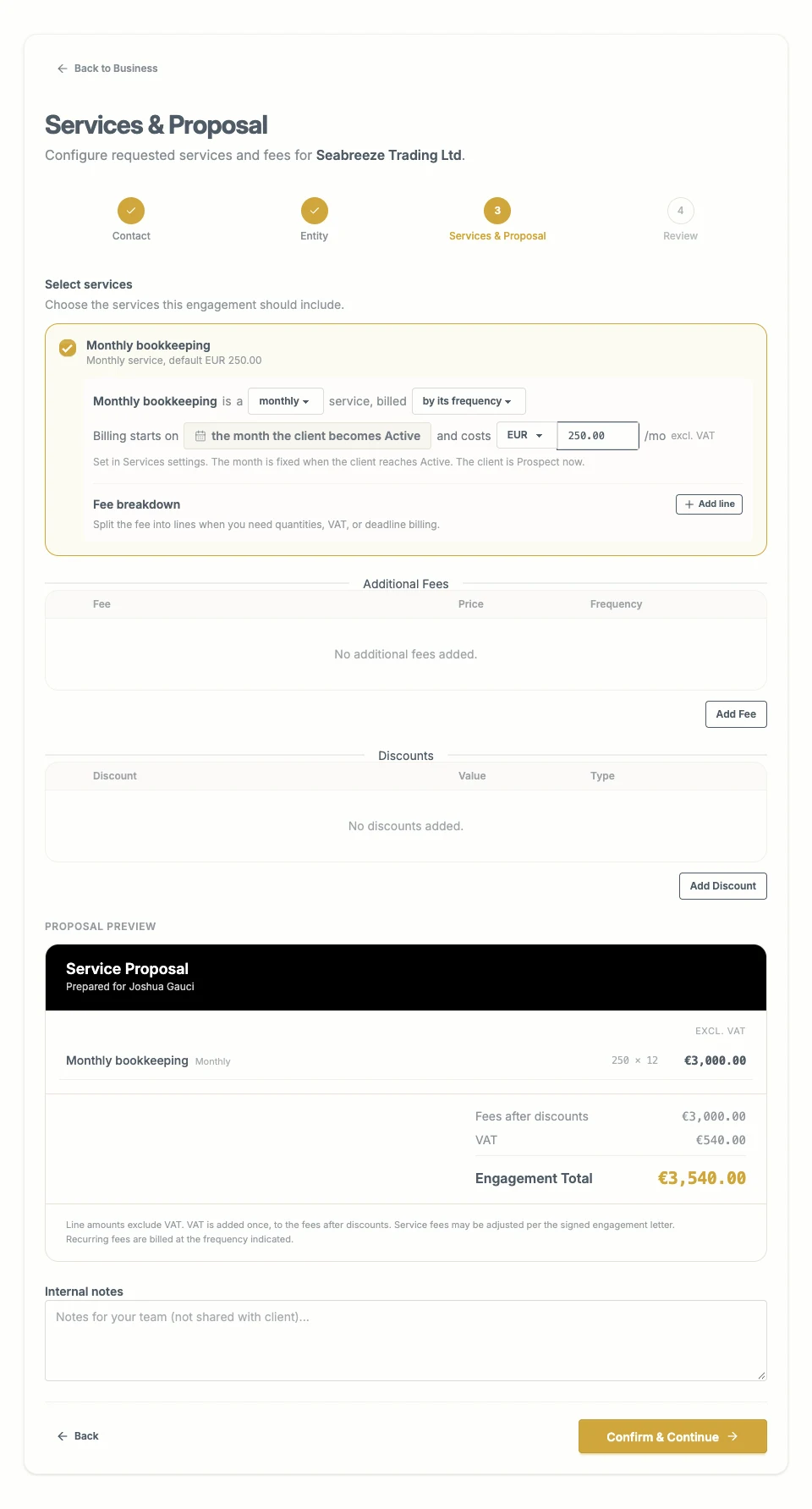
The client’s Service assignment can use an agreed fee that differs from the catalogue default. The proposal preview annualises recurring charges.
Service frequency and Job frequency
These answer different questions.
- Service frequency: how often the Service is provided, and the frequency used for recurring Service bills.
- Job Template schedule: when particular pieces of work are due.
For example, a monthly bookkeeping Service may need monthly documents and also include an annual Job. Set the appropriate schedules rather than expecting one frequency field to describe every obligation.
Documents and Job Templates
Document requirements describe the files needed for a Service. Applicable requirements can also appear on an individual Job.
The Service also sets the client status at which its shared folder becomes eligible for creation. Different Services can begin collection at different stages: for example, due diligence at Pending Review and bookkeeping at Active. Check the Service’s collection setting.
Job Templates describe scheduled work, applicable client types, and client scope. The Entity needs the Service and any required dates before Ziffa can create the matching work.
Fees and billing
A fee is the amount agreed with the client. The billing trigger determines when it becomes eligible for an invoice draft. A fee shown in a proposal is not proof that an invoice has been issued.
The catalogue fields are explained one by one in Set up Services: the trigger, when billing starts, the Xero revenue account, the default fee, VAT, line items, and the registered company used on a proposal.
Read Jobs and Job Templates and Create and issue bills. To change many assigned fees together, use Adjust client fees.